Archive for the ‘Apple’ Category

If you have followed my blog from its inception you know I feel the phone will become your primary computer. That feeling continues to grow stronger. The more difficult issue is discerning just what path this will take. I have mentioned before that companies can fail by jumping to the final solution and not realizing that change often progresses along a jagged path. My ultimate dream is a device that connects to the proper interface in a transparent fashion.

Right now we have WiFi and Bluetooth. Apple lets AirPlay ride on WiFi. This gives some support for video transfer from an iPad to a TV but requires an Apple TV device to make it happen. However, none of this handles the high bandwidth needed to make the user interface, and the the high definition video that goes with it, work without compromise. Enter standards groups to the rescue; unfortunately too many groups.

A first stab at this came with wireless USB. This is an ultra wideband technology that allows up to 480Mbs speed but only at a range of 3 meters. This is inadequate for 1080p 60 Hz video much less 3D and higher resolutions. This technology has gotten very little traction.

The early leader was WHDI (Wireless Home Digital Interface) consortium. However, the WirelessHD Consortium has an impressive list of supporters. Next comes the Wireless Gigabit Alliance or WiGig. They also have some big players behind them including some of the same people in WirelessHD. It’s all very confusing.

Recall what I said about major vs. minor trends. This has signs of being a major trend. But wait, it doesn’t “feel” that way. People aren’t scrambling to get wireless video hardware. That’s going to change. There is a lot in the works and it will take time to gel but it will gel.

Who am I betting on? Well, I’ll start with an interesting fact. Of particular interest here is the adoption of support for wireless DisplayPort by WiGig. Not mentioned on the WiGig website is an important name – Apple. Recall that Apple is the big force behind DisplayPort. A second force pushing WiGig is the movement by companies like Panasonic to take WiGig mobile. WIDI is mobile capable but has more challenges extending its speed and flexibility. Another related major announcement is the Qualcomm Atheros AR9004TB chip for WiGig. However, this looks suited for laptops and docking stations and not phones. It will compete with solutions for WirelessHD such as the SiI6320/SiI6310 WirelessHD® HRTX Chipset.

How does this play out? The Qualcomm chip shows the way to docking stations for tablets and phones. These may have some success but the need is for a more embedded solution. That will start with laptops which have the luxury of more board space and larger batteries. However, it will move into phones once the power issue is solved. This won’t be the end. So far I have been discussing wireless video. True transparency will require something more general. For that I expect something like wPCIe from Wilocity to allow full connectivity. Initially wPCIe will allow laptops to wirelessly dock with peripherals. Longer term, this too will migrate into the tablet and the phone. At that point your phone will wirelessly dock with external hard drives, displays, and pretty much anything else you would hook to a desktop.  wPCIe is based on the WiGig standard so it will be a quick extension to WiGig wireless video. That also means that range will be adequate to allow your phone or laptop to be several meters away from the other end of the wirless link.

Currently, none of this matches the speed of Thunderbolt but it may be close enough. WirelessHD has higher speeds already defined and I expect WiGig to follow. Expect WiGig to look a lot like wireless Thunderbolt. Thunderbolt is basically DisplayPort and PCI Express (PCIe). WiDig will also include DisplayPort and PCIe. For true speed freaks, a hard wired connection will always be the best. Thunderbolt will move to 100Gbs when the move is made from copper to fiber. By then WiGig and WirelessHD will just be matching copper connected Thunderbolt in performance.

There’s a lot more at play here that makes it difficult to predict the winner. WIDI works at lower frequencies and can connect through walls. WirelessHD and WiGig are strictly line of sight. However, some of the claims for future versions of WIDI are suspect since they involve very high data rates relative to available frequency bandwidth. WiGig has the ability to move from a WiFi connection to a WiGig connection in a transparent fashion. WIDI is mobile capable now since it rides on older WiFi technology. I am uncertain when a low power WiGig or WirelessHD chip will be available.

Cliches exist because they contain truth in an easy to digest form. There’s an old saying among engineers. “Anyone can build a bridge. It takes a good engineer to do it on time and under budget.”  That one holds the essence of why I consider good engineering more difficult to accomplish than good science. My formal training was as a scientist. I have been around scientific research in both the theoretical and experimental areas and I certainly appreciate the difficulties involved. However, it is the imposition of schedule and budget into engineering that makes it even more difficult than good science. Budget doesn’t just apply to the resources involved in the creation of the item but also involves the cost of manufacture. Great engineering means understanding “Just good enough.” Like many topics in this blog the concept of “Just good enough” is much broader and more important than many people think. It is related to the concept of quality. In his book Quality is Free, Philip Crosby defines quality as “conformance to requirements.” Great engineering meets the customer’s needs in the best manner. Best, in most cases, means finding a solution the customer can afford. For this reason designing a mid sized sedan like the Honda Accord is much more difficult than designing something like a Ferrari Italia. The Accord is in a much more competitive space and has tremendous budget constraints. If you want to upgrade the audio system then you have to find cost savings elsewhere. Many thousands of components have characteristics that must be traded off in order to meet the target price-point. The Ferrari design starts by asking “What’s best?” Just for fun, when it comes to the Accord, you get to layer on tougher customer expectations. The Accord isn’t a showpiece. It is a day-to-day working automobile and must perform perfectly for many years with few service needs. The Ferrari is expected to require some pampering. Even several year old Ferraris usually have just a few thousand miles on them. The Accord is a much tougher design challenge.

One engineer I admire is Steve Wozniak. If you look at the Apple II, the computer that made Apple a real company, you find many examples of awesome engineering. Again and again features are included and performance is achieved with elegant rather than brute force design. The result was a great combination of features at a reasonable price for its day. To highlight what I mean by “just good enough” I am going to single out just one of the many elegant design choices in the Apple II; but first I need to set the stage.

The personal computing era was kicked off in 1975 with the January issue of Popular Electronics. The cover article was on the construction of a computer kit called the MITS Altair 8800. With it came the introduction of the S100 bus. The Altair 8800 was a frame style design where cards were added to increase functionality. While many functions such as main memory have moved to the motherboard, we retain this expansion concept today although the S100 bus has mostly moved into history.

The Altair 8800 was copied by many companies and expanded upon. The S100 bus became an industry standard expansion bus. Lots of companies made cards for the S100 bus. Because of this a lot of computers placed only the basics on the motherboard in an effort to control price. There are problems with this approach. Since there was no game controller (joystick, paddle, buttons) functionality included in the Altair, there was no standardized game interface. I once looked at the cost of adding joysticks to an S100 based computer. The card alone was several hundred dollars. The approach involved expensive analog to digital converters (ADCs). The result was that only keyboard based games evolved for the S100 based machines.

During this time, games like Pong and Breakout were popular. It made sense to bring them to personal computers but they required interactive game controllers i.e. paddles or joysticks. A keyboard used as a controller lacked the same smooth interactivity. Using the keyboard for games was a compromise aimed at satisfying the engineers and accountants and not the customers but it was a compromise most computer manufacturers had adopted. Enter Apple and a few others. In 1977 Apple introduced the Apple II. It came with game paddles along with games like Breakout. To accomplish this in a cost effective manner, Wozniak pushed most of the design into software. Since he had designed Breakout in hardware for Atari, this was a big change in mindset. Great engineers adopt what is best as opposed to just reworking what they did in the past. Simplifying hardware and pushing complexity into software would turn out to be a very important trend. Here was that trend at a very early stage. Look at the schematic below.

This is part of the schematic of the Apple II included in the Apple II Reference Manual dated January 1978. What looks like a 553 integrated circuit (H13) is actually a 558. This is a quad version of the venerable 555 timer chip. The 558 is used to generate four paddle, or two joystick, inputs. Each paddle is just a variable resistor. Hooked into the 558, the resistance of the paddle controller determines the oscillation frequency of a simple RC oscillator. A loop in the code keeps reading the oscillator. The microprocessor can only read a 1 or a 0. If the voltage is above a certain level the microprocessor sees a 1. Below that it sees a 0. The Apple II loops while looking at the game paddle input. By looking at the pattern, for example 111000111000111000, it can determine the frequency of oscillation. This is then related to a game paddle position and the screen paddle is moved to the appropriate screen position. The beauty of this is that the paddle controller doesn’t have to be super linear. The paddles just need to be consistent i.e. all paddles need to act the same way. Nonlinearities can be corrected in software. To the user, using visual feedback as he looks at the screen while turning the paddle, this is all “just good enough.” It is also a high quality solution since it meets the user’s expectations and the requirements for playing games like Breakout. Including games and controllers gave the Apple II great consumer appeal and was a big part of its success and with it the success of Apple Computer.

Today we often see companies just iterating on a theme. These are the so-so companies. Great companies sit back, look at the bigger picture and think about possibilities. Rather than layering expensive, iterative solutions on each other, the great companies rethink the approach and create solutions that are cost effective while meeting user requirements. Exceptional companies go beyond this and create solutions to user requirements that the user didn’t know he had. That, however, is a topic for another post.

I’m back home and connected. Yeah! My kids are happy since World of Warcraft now works well. I’m trying to catch up and realized I haven’t posted in several days. Next week won’t be any better since I will be heading to Houston for a behind the scenes tour of Mission Control. I hope that trip is as much fun as I expect it will be.

Now to the techie stuff. I was flying today and the conversation turned to how things should work vs. how they really work. Of course the initial topic was about flying. I was working through approach procedures using a new autopilot. I fly a Cirrus SR22 equipped with Avidyne R9 avionics. Recently the autopilot was upgraded from the STEC 55X to the Avidyne DFC-100. This is a big upgrade. The STEC understood rate of turn (from a turn coordinator), altitude (air pressure sensor), course error (from Horizontal Situation Indicator), and GPS course. The new autopilot receives input from the GPS, Flight Management System and the Air Data Attitude Heading Reference System. In other words it knows just about everything about the airplane and its condition. It even knows flap position and engine power. The end result is a vastly superior autopilot. Sequencing is automatic (most times – see below). You can put in a flight profile and the plane will fly it including climbs and descents. The operation is very intuitive and a great example of intelligent user interface design. If you are climbing at a fixed IAS (Indicated AirSpeed) and set up to lock onto a fixed altitude the IAS button is green to show it is active and the ALT button is blue to show it is enabled but not locked. When you get to the desired altitude the ALT light blinks green and then goes steady green when locked onto the desired altitude. I could go on and on about how great this is and if you have questions just ask.

Now to more specifics about interface design. When you use the DFC-100 autopilot to fly an instrument landing system, ILS, approach, it is very automatic. If you punch VNAV, vertical navigation, you can  have the autopilot fly the entire procedure including the appropriate altitudes. When the radio signal of the ILS is received and verified correct (all automatic) the system shifts to using the electronic ILS pathway to the runway. So far everything has been very automatic. If you exit the clouds and see the runway you disconnect the autopilot and land. The problem comes when the clouds are too low to see the runway even when you are close and down low. This is a very dangerous time. At the critical point the plane is 200′ above the ground and there is little margin for error. If you don’t see the ground you execute the missed approach. This is where the great user interface breaks down. If you do nothing the autopilot will fly the plane into the ground. In order to have it fly the missed approach the following must happen. After the final approach fix, but only after, you must press a button labeled Enable Missed Approach. At the decision height when you are 200′ above the ground you must either disconnect the autopilot and start the missed approach procedure manually or shift from ILS to FMS as the navigation source and press the VNAV button. I can hear people, including pilots, asking me what the big deal is. The big deal is that this is when you really want the automatic systems looking over your shoulder and helping out. If you forget to shift from ILS to FMS the plane will want to fly into the ground. That’s a very bad thing. The system is still great. Even at this moment it is much better than the old system. I am not saying I would want to go back. I am saying it could be better and that this operation doesn’t fit with how seamless the autopilot’s operation usually is. What the system should do is automatically arm the missed approach. I see no reason for this to be a required manual operation with the potential to be forgotten. The pilot should select the decision height at which the missed approach will begin to be executed. When that point is reach, if the autopilot has not been disconnected, the autopilot should start flying the missed approach including VNAV functionality. That includes shifting the navigation source from ILS to FMS automatically.  The result would be increased safety since the system wouldn’t be requiring command input from the pilot at a critical moment.

The discussion above relates to what I have been covering in this blog. As computing systems improve and move into every area of our lives, issues like the one above will pop up. Everything about the DFC-100 is vastly superior to the old STEC. The issue is consistency of use. As our computing systems get better and better user interfaces, minor inconsistencies will appear to us as big annoyances. Look at the iPad. If you think of it as an eBook reader that lets you view mail and surf the web it is an awesome device. If you look at it as a fun device with simple apps and games it is awesome. As soon as you want it to be your main computer, things like the lack of a user accessible directory structure become big. Compared to the old Newton or the PDA, the iPad and the iPhone are major advances. However, with this new capability comes raised expectations. Developers don’t get to do great things and then sit back. As soon as users get comfortable with the new, next great thing they begin to find annoyances. One of Apple’s strengths has been minimizing these annoyances but even on the best devices they are there. Consistency of user experience is a big deal. Getting there is tough. My point is that small details matter. How the icons look, how smooth the scrolling is, the animation when actions are taken are all small things that matter. One of the reasons for the success of the iPad and iPhone has been this consistency and sweating the details when it comes to the user interface. As we merge devices and functions in the post PC world it will be critical that these disruptions, the non-transparent use scenarios be identified and fixed.

Firemint has announced a dual screen capability for Real Racing 2 HD which uses AirPlay mirroring in iOS5 to show a race car on your TV (via Apple TV) while status information is on your iPad. The iPad acts as the controller. This is a bit similar to what Nintendo is showing at E3 for their Wii U. However, what I don’t see is multiplayer. Also, the iPad is running the game. Apple TV is just acting as a display device. This isn’t as complete as where Nintendo is heading but I see no reason it can’t be. Apple just has to make the Apple TV a gaming platform. Come on Apple. The hooks are there.

At WWDC Apple announced an improved AirPlay in iOS5. I have broken this out for a separate post because it has gotten little attention from the mainstream press and has huge near and long term implications. The key new feature to focus on is AirPlay mirroring. In the near term this is all about corporate penetration. Mirroring works on the iPad 2 and allows you to display the screen on a separate device; for example a TV with Apple TV attached. This is another step towards using the iPad as a presentation device. All that is needed is a wireless receiver that can be hooked to the projectors now standard in corporate meeting rooms. That would allow cordless mobility using the iPad as a small, easy to hold, presentation device. There is a lot of near term potential here. This is about way more than a few extra iPad sales. Apple has always been viewed as a consumer company. The iPad is changing that and the result is big. RIM had the iPhone locked out of the corporate market. Recent security improvements on the iPhone together with the iPad being adopted in the corporate market has changed that. The result is that RINM is losing its hold on the corporate world. Driving the iPad deeper into the corporate world will extend this and prevent the Playbook from getting traction. The iPad has the potential to be the de facto corporate presentation device. Apple just needs to listen to me and make the wireless battery powered AirPlay display adapter. Throw in transparent collaborative syncing of files and corporate presentations just got a lot easier and slicker.

In the long term AirPlay mirroring takes on even greater importance in an entirely different way. First, you have to move AirPlay mirroring to the phone. Then add in a data link over Bluetooth. What you now have is the ability to merge the phone completely into the automobile. This will take a lot of work to be done in a way that is clean and aids rather than distracts the driver. As a simple example, however, imagine playing movies stored on your phone on a display in the car. Another example would be using the GPS and navigation software in your phone to display a map and directions on the display in your car along with voice guidance through the car’s audio system. Commands would be given through controls on the steering wheel and voice commands. This is a small but important step towards making the phone the dominant computing platform by a wide margin.

At WWDC, Apple announced iMessage. This is a direct attack on BBM. BBM has been a cornerstone RIM product. BBM has been about what makes a Blackberry different. Ouch! At every turn Blackberry seems to lose relevancy and it’s ecosystem gets passed. The Playbook is getting a lot of ad time right now but the Samsung Galaxy Tab 10.1 is just about to hit stores and it will be a much better tablet for those who eschew the Apple ecosystem. I hate to keep repeating myself but I see little from RIM to give me hope. All I see is a painful decay. In and of itself iMessage is just another small evolutionary step towards convergence and transparency similar to the nice moves Microsoft made in Mango. For RIM it is another big blow.

I didn’t publish anything Monday or Tuesday. I was busy digesting what was coming out of WWDC and E3. I won’t regurgitate the standard stuff covered better by sites such as Engadget. Rather I want to comment on what people missed or only put down as a footnote. However, I do need to go through a few big items. First, WWDC is notable for no new hardware and few surprises. Little made me go WOW! The cloud is taking on more importance. However, a lot of this has already been done by Microsoft and Google. What Apple brings, get ready for it, is better transparency of use. If you are willing to buy into the Apple ecosystem then you get data transparency in return. The same goes for Microsoft and Google but the Apple approach is more automatic and, here is that word I overuse, transparent. This is an ecosystem war. Who gets left out? Well, I’n not buying any stock in RIM.

Everyone is talking about what the cloud will do. Here is what it won’t do. Right now no one has it syncing apps or present device status. That means when you move from one device to another you don’t just pick up where you left off. Your data will be there but you will have to open an appropriate application and load the data. If you don’t have an appropriate application installed, for example Excel, then well… it won’t be installed. So, all of the new stuff  coming out is a step in the right direction but just a step.

I liked Apple’s Match announcement but it just highlights the bandwidth limitations that make a pure cloud existence less than thrilling. The bandwidth issue is one of many reasons I am less than thrilled with Google’s Chromebook concept. Also, you will have to be careful with iCloud to make sure you really have your photos backed up since they only remain in the cloud for 30 days. In the end the cloud is great for syncing and sharing but i don’t want it to be my only data storage location.

As far as E3 is concerned there was the usual plethora of game announcements. On the hardware front Nintendo showed an early version of the Wii U complete with graphics generated on Xbox 360 and PS3. Yes, you read that correctly. Some of the example graphics were actually generated on competitor’s platforms. What’s notable about the Wii U isn’t the fact that it has a faster processor or 1080p graphics. The big deal is the new touch screen controller. It lets you play without using the TV set or if you do use the TV, have a second display. Wait, isn’t this just like what I was suggesting for Apple? Oh yeah, the Nintendo controller includes accelerometers and gyros just like an iPhone. Nintendo is on the right tract. However, Apple, Google and Microsoft are all coming from stronger positions if they will just see it and actually attack this space.

I have discussed the need for wireless charging on several occasions and mentioned a new ultrasonic technique here. One issue with the ultrasonic method is inefficient penetration of materials. For example, a simple mobile phone case has the potential to prevent charging. My version of transparency demands that the user have to do nothing to connect. It needs to occur well ummm…. transparently. I mentioned the problem with inductive charging being range and the need for a one meter range. Well, I was mistaken about the limitations of inductive charging. In fact, mistaken is an understatement. Back in 2007, Karalis, Joannopoulos, and Soljac published “Efficient wireless non-radiative mid-range energy transfer” in Annals of Physics. Apple was more observant than I am and picked up on this. The result is their patent “Wireless Power Utilization in a Local Computing Environment.” It describes wireless charging over about a one meter range. The near term impacts of this are small but the long range impact will almost certainly be huge. This isn’t a one off patent from Apple. They have already been looking at more typical very short range inductive charging solutions. For example patent 7352567, “Methods and apparatuses for docking a portable electronic device that has a planar like configuration and that operates in multiple orientations”, describes a wireless charging and data connection base for the iPad. It’s interesting for also including a wireless data connection in the base.

In terms of long range potential, imagine having your phone charged while you drive your car or while you sit at your desk at work or when you sit in your recliner at home watching TV. Freeing the phone from its battery limitations opens it up to become your primary computing device where you are able to rely on it always being there. This is huge. Google, Apple and Microsoft are all working on syncing through the cloud. However, that only goes so far. They are syncing data and not applications. Also, it will be a long time before truly high speed wireless data is everywhere.

Pioneer announced the AppRadio a few weeks back . You can read about it here. I got excited at first. I thought they had really integrated the iPhone into the radio. Instead it runs its own apps. I want it to display my iPhone on a screen in my car so that I run the apps on my iPhone. I don’t need yet another device to get apps for. I want to run the ones I already have on my iPhone.  I was kind to Mulally in my last post. That’s because I feel he is pushing Ford in the right direction. Still, will someone please “get it” that the phone is primary and the car should include an interface to the phone rather than duplicating the smartphone’s functionality?

I mentioned that Mango showed that Microsoft could come on strong once they recognized they were behind. I saw a few unexpected features in Mango and it gave me hope that Microsoft was still in the game if very far behind. However, with the release of more information about Windows 8, I am truly surprised. Microsoft really gets it. They see the need for a unified OS across platforms and for a transparent user experience. Furthermore, Microsoft is using its strength on the desktop to leverage itself into the tablet and phone space. This isn’t my pick for the easiest path in general but it is the easiest and best way for Microsoft. More than other releases, Windows 8 will be about an aggressive business strategy. I love it when business, the consumer, and engineering mesh at such an intimate level.

Windows 8 is important on several levels. First, let’s start with the fact that it will not only run on X86 CPU’s but on ARM. Wow! Let that sink in. This means Windows on a CPU that isn’t compatible with the Intel X86 architecture. There will be no emulation layer so current X86 apps won’t run on ARM based hardware. However, this is important in and of itself. Microsoft will be encouraging developers writing lighter apps to write in Java and HTML5 so the apps will be independent of the CPU used. Add this to Apple toying with the idea of an ARM based MacBook Air and you know why Intel is nervous.

The next surprise is the breadth of Windows 8. It is really a tablet  OS where the mouse and keyboard can substitute for touch. You read that correctly. The OS is, in many ways, a tablet OS first and a desktop OS second. This doesn’t mean a compromised desktop OS. What it does mean is an OS with touch infused throughout.  The same OS will run on tablets, laptops and desktops.

They say a picture is worth a thousand words and the next surprise is best illustrated with a couple of pictures. Here is one of Windows 8 on a PC:

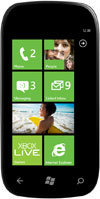
Next I have a picture of the home screen from a phone running Windows Phone.

Do you see what I am excited about? Just like Apple, Microsoft is making the desktop OS look and feel like the phone OS. Do you believe me now when I talk about the push for transparency of the computing experience? Now go back to the comment above about Microsoft pushing for apps written in HTML5 and Java. Those will be easy to port to Windows Phone and vice versa. Microsoft may be late but they are coming on strong.

What does this mean on the business side? Obviously the push onto ARM is a threat to Intel and AMD. In terms of the other hardware and software players here is how I see it. RIM is in an increasingly bad position. They have zero desktop presence and Microsoft is stronger in the corporate world than RIM. Windows 8 might seem independent of RIM’s Blackberry world but, in actuality, it has the potential to do great damage. HP may take a hit too. They are betting a lot on WebOS. I don’t see what the value add is for WebOS. Call this one more wait and see but be skeptical. HP could quickly shift to being Windows 8 centric if need be. Heck, they are Windows centric today.  Apple probably fairs OK in the near term. Longer term they might lose some of their momentum. However, I see Apple as the best positioned against Windows 8 if they can continue to move towards merging iOS and OSX. I’m still very strong on Apple. Next up for Apple is iOS 5 and iCloud which will be announced next week. Windows 8 could be problematic for Google. I have trouble believing in Chrome as a desktop OS. Google will still be ahead in the TV space but compared to Microsoft and Apple they lack the desktop. Android is the largest selling smartphone OS and we are about to be inundated with Android tablets including some excellent ones such as the Samsung 10.1. I still see Microsoft being behind Google but it is a lot more interesting than it was a day ago. Apple just made iWork available on the iPhone in addition to the iPad and OSX devices. Microsoft will have Office running across all devices. Will people buy into Google’s idea that web based solutions are the best answer for their productivity apps? People may but only if Microsoft screws things up. Then again, Microsoft mucked things up in the past with poorly conceived products like Works.