Archive for the ‘Apple’ Category

A Tasty Mango

Posted: May 26, 2011 in Apple, Google, Microsoft
Tags: ,

Microsoft just described some of the changes in their next release of Windows Mobile 7 which they are calling Mango. If you have been following along with me then you know I haven’t been kind to Microsoft. If this was a horse race, the gates opened and the Microsoft horse just stood there. However, Microsoft is a strong horse. Once you get Microsoft’s attention, they can be a tough competitor. Just ask Netscape. This shows with the introduction of Mango.

At one time Microsoft had a large share of the smartphone world. With Windows Mobile 6 they had a powerful if flawed basic platform. However, it was conceptually trying to be the desktop version of Windows crammed into a phone and it could be a real pain to use. The browser was next to worthless. Then Apple introduced the iPhone and changed the landscape. While late, Microsoft released Windows Mobile 7 in an attempt to become relevant again. It takes a bit of a different approach and isn’t as “me too” as one might expect of a product coming from Microsoft. However, there were major limitations. Heck, even cut and paste wasn’t supported. That was fixed in a patch release but yesterday Microsoft showed more than patches. They showed that Microsoft can actually have some vision. I’m not going to go over all that was presented. Microsoft is claiming over 500 changes. I suggest you read here and here. What I want to comment on is a theme that I see in Mango and perhaps the long term direction of Windows Mobile. That theme is integration. This means integration of social networking and integration of search. More importantly, the underpinnings are there to enable deeper integration as developers take advantage of the new hooks in Windows Mobile. Here are a couple of relevant comments direct from Microsoft:

Threads. Switch between text, Facebook chat and Windows Live Messenger within the same conversation.

Hands-free messaging. Built-in voice-to-text and text-to-voice support enables hands-free texting or chatting.

App Connect. By connecting apps to search results and deepening their integration with Windows Phone Hubs, including Music and Video and Pictures, “Mango” allows apps to be surfaced when and where they make sense.

Improved Live Tiles. Get real-time information from apps without having to open them. Live Tiles can be more dynamic and hold more information.

I suspect we’ll see more voice to text and text to voice in upcoming releases of Android and iOS. The ability of search to interact with other apps and the merging of threads form Facebook, text, and Messenger hint at something bigger. Microsoft is breaking down app isolation. This is a very interesting trend they are pushing. I have been thinking of transparency of data and use but this is different. It means doing what you want when you want and thinking less about which app you are using and more about what you want to do. It compliments what I have been discussing and, in hindsight, seems obvious. It made me think about how isolated apps are in iOS and how nice it would be if they weren’t.

I still see Microsoft in a weak position. They are a distant third in the phone OS war and don’t have an entry in the tablet area. As far as the TV set, Windows Media Player seems stagnant and still focused on the PC. Still, Mango adds excitement to Windows Mobile. We’ll have to wait and see if Google and Apple offer compelling moves in the app integration area. This “Post PC Era” battle is going to be interesting and a lot of fun to watch.

Did Intel read my blog? Interesting posts about Intel here and here and here.

Of the Android tablets, the Xoom was the first to look reasonable but the iPad 2 made it look dated. The first real iPad 2 challenger appears to be the Samsung Galaxy Tab 10.1. Don’t confuse this with the thicker 10.1v. Engadget has a good review here. They also have a review of the HTC Flyer posted here. While not as positive as the Galaxy Tab review, I think the integration of audio and notes on the Flyer has a lot of promise.

Does anyone else think Microsoft buying Nokia’s smartphone business is a bad idea? That would make Microsoft like Apple but still trying to be like Google. Pick an approach! If Microsoft tries to straddle the fence then they will fail. Why should HTC or anyone else make a Windows Mobile phone if their direct competition on the Windows Mobile space will be Microsoft. Microsoft could wind up being the sole manufacturer of Windows Mobile phones. At that point I give a big advantage to Apple.

I haven’t talked much about Chrome and the Chromebook. A good article on them is here.

If you are following what I am saying about transparency and convergence I suggest you read  Sarah Rotman Epps’ Blog.

In looking back at my comments on transparency I realize I might be giving the wrong impression. Data transparency is moving along. However, creating software that makes moving from one device to another transparent is very hard to accomplish. It involves making the transition from one UI to another transparent or, coming from the other direction, involves making one UI work across several devices. Consider where this has been most successfully done i.e. the iPad and iPhone. Both the iPhone and the iPad use the same OS with the same UI. However, in accomplishing this, the tablet version of iOS has been hindered by the need to work well on the much smaller screen of the iPhone. Google has taken a different approach. Their tablet version of Android is noticeably different from the phone version. The result is that Apple and Google are coming at the problem from opposite directions. With Ice Cream Sandwich, Google will try to unify the tablet and phone experience and thereby improve transparency when moving between the devices. Apple, with iOS 5, will try to bring better functionality to iOS so their tablet offering is less restricted by the OS and is able to come closer to the functionality of a full blown laptop.

But tablets and phones are closely related. Any problems encountered while working to achieve transparency between the two pale compared to merging the experience with other devices. Consider the TV set. It lacks a touch screen. Any keyboard linked to the TV set will almost certainly be less than full sized. It would be easy to claim that the TV is fundamentally different and to forget transparency altogether.  That would be a mistake. There is too much money at stake to take the easy way out. Here is where human factors specialists will have to shine. They will have to craft a different OS interface than that on a phone or tablet but one which feels very similar to the phone OS interface such that knowing the phone OS takes the TV OS learning curve to zero.The same will be true when looking at the man-machine interface in the automobile. Here, minimizing driver distraction will be the main goal. There are two aspects to driver distraction and they will sometimes work against each other. On the one hand, making the automobile UI look like the phone UI will allow use to be more second nature and thereby require less conscious thought on the part of the driver. The problem is that a phone OS will sometimes require that the driver look away from the road. That’s not good. A compromise will have to be reached. Like the TV, there will be other ways of interfacing to the UI than just a touch screen. There will be voice, steering wheel controls and probably a mouse like device similar to what BMW uses on its infamous iDrive.

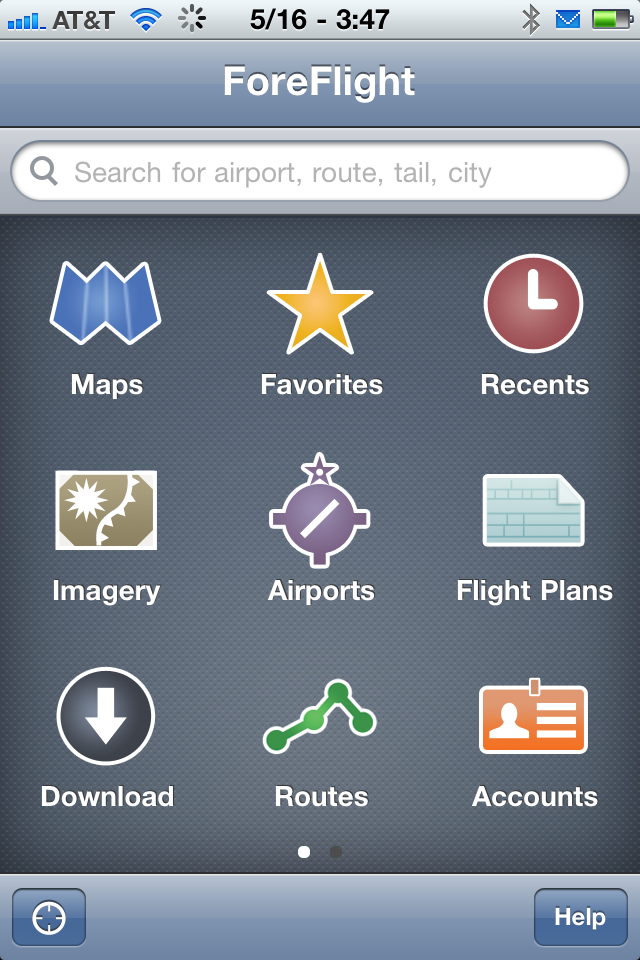
This high difficulty level extends to applications. I really like those iTunes store apps that have the plus sign next to the price. You pay once and you get something that works on both your iPhone and iPad. I hate paying twice for an app just because I want it on my iPhone and my iPad. Down the road I want to buy an app once and use it on whatever device is handy. This trend is already in full play. Just take a look at Steam. When you buy a program through Steam, you can download and install it on any machine you like. You log into your Steam account to gain access. The main problem here is that you have to download a large program for each device but that could be easily automated. Also, as more programs exist in the cloud, this will be less of an issue. Already some programs allow the user to start playing while sections of code not in use continue to download. The big problem is interface design. Imagine making Crysis work on everything from a phone to a TV set. That’s not easy. It is particularly difficult if the user wants to pick up a game in progress on one device, say a TV, where he left off on another such as his phone. To get an idea of the scope of the problem look at Foreflight. This is a great aviation app with an excellent user interface. However, their iPhone and iPad apps are two completely different animals. With Foreflight this isn’t too big of an issue since the apps are free and the database subscription allows use on an iPhone and an iPad at the same time. The photos below show how different the interface has to be because of screen size.

The iPad version of Foreflight allows selecting different pages from any current page. Look at the bottom of the picture below.

Sections like AIRPORTS and DOWNLOADS can be selected on the bottom. Now look at these screen captures from the iPhone app. The first shows the page equivalent to the iPad page shown above.

Here you select CLOSE which takes you to this page:

Now you can select the page you want.

I am not picking on Foreflight. Rather, I am highlighting what they have done as an example of adapting to the different screen sizes of the two devices while maintaining a lot of the same feel so that the learning curve is low. However, this is the easy part. Adapting to TV, car, laptop etc. will be a lot more difficult. If you are a pilot you might be wondering why anyone would want to use this program across so many devices. But, if transparent use and data is really achieved then imagine the following scenario. You are watching TV with some friends when the talk turns to playing golf on Hilton Head the next day. You bring up Foreflight on the TV and flight plan the trip to find out the flight time and take an initial look at weather. The next morning you quickly update and file the flight plan using your laptop. On the way to the airport you notice that the morning clouds haven’t burned off as expected so you decide to check the current airport weather. Your car interfaces into the Foreflight app on your phone and you are able to bring up the weather. In the air passengers follow the flight’s progress on the iPad using the same program. You have bought one application and used it across numerous devices. It feels easy and natural to do but it was only easy for you. For the developers it was a tough task. They had to sweat the user interface and how it would appear on different devices. The device manufacturers had to sweat the user interface of the OS to make sure this transparent usage would , well…, really be transparent.

If you have been following along with my comments on transparency you might think the only big prize is owning the phone market or the tablet market or both. There’s another prize that’s very big. To understand it you need to take a look at PayPal. When I am online I like it when PayPal is a payment option. I don’t have to pull out my credit card. I just have to remember my PayPal login and I can complete my desired purchase. What if every transaction in the US went through two or three companies? This would be like a super PayPal. It wouldn’t just be online transactions but local purchases such as groceries, gas, clothes and dining.

It’s time for some simple math fun. April 2011 retail sales in the US were approximately $390B. One percent of that is $3.9B. If a company could get a third of this it would be $1.3B. That’s per month or $3.9B per quarter. This is only for the US. How do you get 1% of every transaction? You make them flow through your device. With NFC, the phone is the gateway to your credit card. When watching TV,  think GoogleTV or Apple TV. What if all you needed was one account with Google or Apple and you could cover all of your bills using your phone or your TV? This makes iTunes look puny. Don’t kid yourself, both Google and Apple are eyeing this. I suspect Microsoft is too but they are a bit late.

Amazon, a company I haven’t mentioned till now, sees this  too. Their solution has been to be the central online shopping site. However, remember how the Germans went around the Maginot Line? Remember how I said Apple and Google were doing a similar end around on the Wintel alliance? We could have another end around play here. Imagine your phone being your main device for purchases i.e. replacing your credit card. Apple and Google could move in on Visa and Mastercard. Now that they have you funneling your purchases through them it’s a small step to begin guiding those purchases. Think Apple App Store on a huge scale. Think of the Google Market Place but selling more than apps. Both of these companies are sitting on large amounts of cash and looking for ways to turn that into even larger revenue and profits. What can Amazon do? They can take a clue from their Kindle line. I don’t own a Kindle. However, there are Kindle apps on my laptop, my desktop, my phone and my tablet. When I buy ebooks my first choice is through Amazon. I don’t buy through iBooks because iBooks isn’t as broadly cross platform as Kindle. It’s that old transparency of data thing again. By buying through Kindle (Amazon) I can read the book on all of my devices. I read them where I want, when I want, and on the device I want to use.  Amazon needs to be the one company that will allow both your Apple device and your Android device to use the same account. At all cost they need to make sure the various platforms are open enough to allow them to be the central clearinghouse for your purchases. The same can be said for Mastercard and Visa. Those two companies dominate the landscape right now. However, fundamental changes are afoot and that always spells opportunity for others. For the first time Visa and Mastercard are vulnerable.

When will this take place? No time in the near future as far as the general public will see. However, the initial steps are being taken now. At first you will just place your credit card information in your phone and use it instead of the physical card. This is only slightly different from having Amazon store your credit card information with your account. From there it’s a small step to add extras to the Apple and Google app stores. Finally, Apple or Google issue you the credit line and push Visa and Mastercard out. They will be able to do this by offering incentives from the savings generated by not shipping Mastercard or Visa 2%.

Fragmentation in Your Face

Posted: May 12, 2011 in Apple, Google
Tags: , , ,

I thought I was done posting for today. Then I saw something in the Android Marketplace. I don’t own an Android phone so I don’t go roaming around market.android.com very often. I do however, think Netflix is a very influential company and that media streaming is where TV is headed. So, rummaging around I found this:

Get Netflix on your Android phone. Just download this free app and you can instantly watch TV shows & movies streaming from Netflix.

• It’s part of your Netflix unlimited membership. Not a Netflix member? Start your FREE trial today.
• Watch as often as you want.
• Resume watching where you left off on your TV or computer.
• Browse movies and manage your instant Queue right from your phone.

Currently Netflix playback is supported on the following phones:

• HTC Incredible with Android 2.2
• HTC Nexus One with Android 2.2, 2.3
• HTC Evo 4G with Android 2.2
• HTC G2 with Android 2.2 
• Samsung Nexus S with Android 2.3

You can click the link if you must but the key info is above. What struck me was the limited number of devices. Now I use an iPhone. There are certainly apps that won’t work with older iPhones but most do. Besides Apple users are expected to upgrade every two to four years anyway <BG>. What strikes me about the above listing is how many recently introduced Android phones aren’t listed. Shouldn’t any Android phone introduced in the last two years automatically be on this list? This is a big issue for Android. The Android brand needs to mean something. It’s OK to say any phone with Android 2.2 or later. The key should be the ANY PHONE part. If you can run a certain version of the OS then you should be able to run the app if your phone is a relatively new one. Now I suspect that may really be the case but the fact that it isn’t stated that way on the app store is a problem. Maybe it could say Android 2.2. and 1.0GHZ processor or faster and 512MB RAM. That’s a bit of a pain but it is generic. That’s what happens in PC land. What if every PC program had to have a model list that you checked to see if it would run on your machine? Crazy right? Fragmentation is a real issue for Google and the Android brand.


I’m going to go out on a limb and make some suggestions to Apple. As their recent meager earnings and growth show, they really need my advice.

Apple TV needs to be transformed. Start by allowing apps to run on it. The goal should be to make it a casual gaming platform. Card games would work especially well. The TV would show the overall table. Each player would view his hand on an iPhone, iPod Touch, or iPad. A simple controller could be developed and sold for people without the above devices. The key is that this would integrate the Apple community of devices. iOS devices have already reached a portable gaming market share that challenges Nintendo DS.  It’s time for Apple TV to attack the Wii.

As the trends of transparency and convergence move forward it is going to be more and more important that moving from device to device is seamless. iOS on Apple TV needs to be the same overall as iOS on the iPad etc.

I said Apple TV needs to be transformed. That includes the hardware form factor. The present product is fine as an add-on device. However, GoogleTV is a big threat and the largest threat will be from TV manufacturers integrating GoogleTV into their TV sets. That will remove a lot of the value of getting an Apple TV device. This presents a dilemma. How does Apple retain total control of Apple TV, including the hardware, while attacking GoogleTV. The answer is to build a version of Apple TV in a slim card format that can be installed in a standardized slot on a TV. The manufacturer will get to advertise “Apple TV inside.” Apple will get to control the hardware and software. Furthermore, while TV sets have long replacement cycles, Apple will still be able to tempt consumers to update their Apple TV card every two to four years at a $99 cost. As GoogleTV gets built inside of TV’s this will be an issue for Google. We already see that the original Android phones can’t run the newest releases of Android.

When OSX and iOS merge, Apple will have a single solution across desktop, laptop, tablet, phone, and TV. Furthermore, most of their solution will fit the model of upgrading every two to four years. That not only generates increased revenue but it allows the software to move forward without being hampered by legacy device issues. Microsoft has been hindered by the need to have Windows run on old hardware. This has been less of an issue for Apple. Apple should work to maintain that advantage.

Eventually the content on your phone will link to your TV. Video calls will transfer seamlessly from device to device. The winning companies will be the ones that generate an integrated and transparent ecosystem of devices. Apple has a tremendous opportunity here. The iPhone and iPad are seamless to move between. OSX, with the introduction of Lion, will look more like iOS. That leaves the TV. Apple can certainly position the iMac as a TV. However, that market will be small compared to the TV market as a whole. They will be in danger of being overwhelmed by GoogleTV. Today companies like Panasonic offer their own, proprietary internet connectivity solutions. In the future they will look to go with a mainstream third party solution. Apple needs to make sure they are a big portion of the solution.

Apple TV has been almost a hobby device for Apple. That is changing. It’s time for Apple to see how important it is to make Apple TV become the standard for TV connection to the internet. Eventually it become a streaming media world. As convergence progresses the DVD player will disappear as will the set top box. The game console will disappear too. There will just be the TV. Apple needs to make sure they are in that TV.

Nit Picks for Apple

Posted: May 12, 2011 in Apple
Tags: , ,

Here are some small things I would like to see Apple change.

  1. Make printing in OSX consistent across apps. I can print to a PDF in Preview but not from iPhoto and not if I select a file in Finder and then select Print.
  2. Make printing return addresses easier. You can easily print contacts to address labels but you can’t fill a sheet of address labels with one contact. This makes printing a bunch of return address labels very frustrating.
  3. Allow placing the menu bar on individual windows like in Windows. Being in a window on the lower right of a 30” monitor makes it a pain to go all the way to the upper left of the monitor to get to File Print.
  4. Make it so iTunes uses the Pictures, Music and Movies directories and create a new standard directory named Books. Use these. If possible make iPhoto use them too.
  5. Add automatic backup to iWorks applications.
  6. Allow access to a directory structure in iOS. At the least generate a Documents directory and allow access to it and the creation of subdirectories. I should be able to save a PDF and open it with multiple programs. Similarly, when a web site wants me to upload a fie I should be able to place the file in Documents and then select it for upload using the website’s interface.

Lesson of the Week

Posted: May 11, 2011 in Apple, iPad
Tags: , , ,

“Save your work.” I have given that advice more times than I can remember. I should have taken my own advice. I had a couple of topics ready to post today. I wrote them yesterday and figured I would read them over this morning. Late yesterday I went to update my iPad from 4.3.2 to 4.3.3. This is a minor update that has been giving me fits. Yet again the update failed. I called AppleCare and was told I had to completely uninstall Norton 360. It seems Norton was keeping my Mac from communicating with Apple’s server. It made sense so I uninstalled Norton. A reboot was required. I was very good about shutting down Windows and then Parallels before the reboot. Unfortunately, the problem is still there. This morning I went to reread the blog posts I created yesterday. They weren’t there. I had forgotten to save my work. Not to worry I thought. There should be a recovery file. Well, there isn’t. Recently I have been using Pages instead of Word. While less full featured it is cleaner and easier to use for the simple work I have been doing. It seems it lacks the autosave feature of Word. There is no recovery file. Crud. Lesson learned. There is a program, Foreversave, that fixes this but this feature should be a part of all of the iWork applications. Gripe about Microsoft if you will but their Office line dominates its market for a reason.

The old school model has been data everywhere and in its proper place. This directly relates to an old world paper model. Whether at home or at work each bit of data had a place. There was a file folder, nicely labeled, and placed in a drawer. That’s why, when you go to the doctor, you get to write the same information down several times on different sheets of paper. Each sheet has a purpose and a location it will get filed into.  As we have moved into the computer age we have carried this model with us. There was data on the desktop at work, data on the desktop at home, data on the file server and data on the laptop; oh, and data on the phone.

Lo and behold we found that, sometimes, data wasn’t where we wanted it. The first solution was manual transfer. I mean a really manual transfer. We would write data on a piece of paper and enter it back into another computer. Some people still do this when moving contacts from their desktop to their phone. This was replaced by sneaker-net where data was copied onto a storage medium and then read back in on another computer.  First there was the floppy disk and today there is the USB thumb drive. Next came the network. Finally data was easy to move. That is it was easy as long as you were on the net.

The problem was that home wasn’t connected to work nor was the hotel room connected to either one. This was attacked via remote logins and by sending email messages with files attached. However, attachment file size limits have made email problematic for the transfer of large files. FTP transfers had no such limitation but were cumbersome. Another attempt, still widely used today, is syncing. You sync your iPhone and iPad to your home computer so your songs and data travel with you. Less successful have been attempts to sync laptops to your desktop. The latest attempts at fixing this issue have been Dropbox, Yousendit, MobileMe, Windows Live Mesh and Live Sync. These help and are the first steps towards a cloud computing solution. Well, technically, Live Sync and Yousendit aren’t cloud based but I see them as very related. Live Sync can be viewed as a peer to peer extension of classic synchronization software but it feels closer to the cloud solutions when you use it. Actually, Dropbox, MobileMe, and Windows Live Mesh are really a merging of synchronization and cloud services. Synchronization has the advantage of maintaining a local copy so work can continue smoothly when the network is down or slow. The cloud aspect means that you can access your data even when you are away from a machine that is being synchronized. As an example, if a PICTURES folder is on the MobileMe iDisk, under the Dropbox folder, or is selected for Windows Live Mesh, the content in PICTURES can be accessed from a friend’s web browser with the proper login. Sharing content with others is also fairly straightforward. If you haven’t used these services be sure to try them. All but MobileMe are free at the basic level. MobileMe is about to get a major change so hold off on it till you see what the changes bring.

What we are seeing is the rising importance of transparency. In this case it is transparent data access. We want our pictures, music, movies and documents whenever we decide to view them, wherever we happen to be, and using whatever device is handy at the moment. The methods above aren’t totally transparent but they are a big improvement. When I got my iPhone, I left the Apple store with email, contacts and my calendar on my phone. Today, between my laptop, iPad and iPhone, a contact, calendar event or email added to one appears on all of the others.  If need be, I can access it all through a web browser on any machine with web access. Key files, including the document I am editing now, are synchronized across devices as well as being stored in the cloud. What we are seeing is the beginning of data transparency. There is a lot more to be done. In the end you won’t think about where your data is.

Recall what I said about major trends. Do the approaches above seem too similar? Is transparency just a minor trend that seems major? Was I wrong about trends and is this a case of one with a clear development path?  The answer is no to all of the above. There are other directions to data transparency.

Look at the RIM Playbook.Its Blackberry Bridge technology takes a different approach to transparency by tethering the Playbook to a Blackberry phone. One advantage of this is a single data connection, and hence a single expense, for both the phone and the tablet. By definition email is in sync since email is really through the phone at all times.  A big problem with this is that the tablet becomes tethered to the phone in such a strong way that it is no longer a separate device.

Need another direction? Look at the Motorola Atrix with its laptop dock. In this case the laptop is just an accessory screen and keyboard for the phone. Like the Playbook, the laptop is worthless without the phone. For some reason I don’t see that as a major problem. However, layz person that I am, I dislike the idea of having to plug and unplug the phone from the laptop accessory.

Yet another approach was outlined by HP CTO Phil McKinney here. He describes the Fossil Metal Watch which will allow you to carry your data with you.  All of your devices connect to the watch for data access. One problem, among several, is that a lot of people don’t wear a watch anymore. Furthermore, the watch screen is useless for data access. This means that you must, at the minimum, carry a phone in order to have access to a useful screen. Since you are carrying the phone anyway, why not just build the ability to be the data hub into the phone? In reality, that is what is going to happen.

So, what is the final answer? All of the above or at least parts of all of the above will survive the cut. The cloud will become very important and syncing will hang around. Rather than wearing a watch with our data stored on it, we will carry our phones. The phone will move from being an accessory to the laptop to being the main computing device with the laptop as an accessory. The current iPhone has 32GB of storage. It won’t be long until 1TB will be the standard. At that point there will be enough storage for the phone to be the primary data store. But, there will still be a need for offline storage. Also, there is the need to make sure critical data is backed up. That means syncing will stay around. This also means a cloud services component. Cloud services will allow access when the device isn’t with you and the sharing of files with friends. Mixing syncing with cloud services will mean gaining access to you apps and songs and OS updates without resorting to a PC. Expect to see iTunes move more completely to the cloud very soon i.e. in the next few months. What about the Atrix type device? My problem with the Atrix is that I am lazy and I think others are too. I don’t want to take out my phone and plug it in. Instead, I want it to link wirelessly to a keyboard-screen combination. Imagine going home and sitting at your computer. It lights up with what you were working on last. You get up and walk away. The screen goes blank. When you get to work and sit down the screen lights up again with what you were working on. A quick click of a mouse button switches the device to your work configuration and you are on your way. Your tablet will link to your phone to transparently gain access to your data. The same will be true for your TV. Imagine a video call on your phone. You sit down, tap an icon on your phone and the call is transferred to your TV so the entire family can see and talk to Grandma. Wherever we are, we will use the device that suits us at the moment. That device will have immediate access to all of our data. We will move from device to device easily even when we are in the middl of a task. The companies that best develop and integrate with this ecosystem win.

When most people talk about device convergence they are talking about the smartphone. There are actually parallel convergence trends at play and they will eventually run into each other. I mentioned the TV having the potential to pull the media player into the set itself. Now I want to step back just a little and look at that physical ecosystem surrounding the TV. There is the cablebox, the game console, perhaps a media player and maybe even a Slingbox. My system has a TV with a DVR (cable box), Wii, PS3, and a Slingbox.At one time there was also a Netgear media player but that was a less than positive experience. There are two things that immediately stick out with respect to my setup. First there are a lot of wires. Secondly, a lot of capability exists only in one place. The cable box in the bedroom lacks a DVR. I can’t play content recorded on the living room DVR in the bedroom. U-verse would solve that issue but I would have a slower internet connection. I can’t play Wii or PS3 games in my bedroom; nor can I watch Netflix or stream movies off my file server. The tough question is how all of this can be merged into one device, the TV, that can be replicated in each room and networked together. The path is going to be jagged and have many different paths along the way. This means it is a major trend. Let’s outline some potential pathways to my goal. I’m going to start by throwing some things out. The first is the DVD player. As streaming gets better, services like Netflix will diminish the importance of the DVD player. I’ve already discussed the media player merging into the TV. AS for the DVR that’s more difficult because of resistance form companies like Comcast together with Hollywood. I can dream of a Comcast box that resides on my network and serves up video to all of my TV’s while also being my cable modem.  Eventually there will be a single high bandwidth connection to the internet and all movies and TV shows will be streamed to your TV. What about gaming on the Wii and PS3? That’s harder. There is a path but it happens in a couple of stages. Look at how iOS devices are attacking portable gaming. Now look at Apple TV. Why oh why can’t it run apps? It cries to be a big screen version of the iPad.  Well, your TV won’t take touch input but it could take input from your iPhone or iPad. Apple TV doesn’t have to be a great system for the serious gamer. The PC is the serious platform for those guys. The PS3 and the Xbox 360 fit somewhere between the Wii and the PC. Similarly, Android or Google TV could perform the same function running on a or a media box. Once Apple TV has games the only remaining step is to integrate it into the TV. The same is true for the Google platforms. Oh yeah, I haven’t covered the Slingbox. Once your media streams over the internet when you want it rather than on a fixed time schedule, the Slingbox becomes superfluous. It feels weird to write that because, right now, I love my Slingbox and can recommend it highly. However, times keep changing and I don’t see it surviving.