
Archive for the ‘Convergence’ Category

In looking back at my comments on transparency I realize I might be giving the wrong impression. Data transparency is moving along. However, creating software that makes moving from one device to another transparent is very hard to accomplish. It involves making the transition from one UI to another transparent or, coming from the other direction, involves making one UI work across several devices. Consider where this has been most successfully done i.e. the iPad and iPhone. Both the iPhone and the iPad use the same OS with the same UI. However, in accomplishing this, the tablet version of iOS has been hindered by the need to work well on the much smaller screen of the iPhone. Google has taken a different approach. Their tablet version of Android is noticeably different from the phone version. The result is that Apple and Google are coming at the problem from opposite directions. With Ice Cream Sandwich, Google will try to unify the tablet and phone experience and thereby improve transparency when moving between the devices. Apple, with iOS 5, will try to bring better functionality to iOS so their tablet offering is less restricted by the OS and is able to come closer to the functionality of a full blown laptop.

But tablets and phones are closely related. Any problems encountered while working to achieve transparency between the two pale compared to merging the experience with other devices. Consider the TV set. It lacks a touch screen. Any keyboard linked to the TV set will almost certainly be less than full sized. It would be easy to claim that the TV is fundamentally different and to forget transparency altogether.  That would be a mistake. There is too much money at stake to take the easy way out. Here is where human factors specialists will have to shine. They will have to craft a different OS interface than that on a phone or tablet but one which feels very similar to the phone OS interface such that knowing the phone OS takes the TV OS learning curve to zero.The same will be true when looking at the man-machine interface in the automobile. Here, minimizing driver distraction will be the main goal. There are two aspects to driver distraction and they will sometimes work against each other. On the one hand, making the automobile UI look like the phone UI will allow use to be more second nature and thereby require less conscious thought on the part of the driver. The problem is that a phone OS will sometimes require that the driver look away from the road. That’s not good. A compromise will have to be reached. Like the TV, there will be other ways of interfacing to the UI than just a touch screen. There will be voice, steering wheel controls and probably a mouse like device similar to what BMW uses on its infamous iDrive.

This high difficulty level extends to applications. I really like those iTunes store apps that have the plus sign next to the price. You pay once and you get something that works on both your iPhone and iPad. I hate paying twice for an app just because I want it on my iPhone and my iPad. Down the road I want to buy an app once and use it on whatever device is handy. This trend is already in full play. Just take a look at Steam. When you buy a program through Steam, you can download and install it on any machine you like. You log into your Steam account to gain access. The main problem here is that you have to download a large program for each device but that could be easily automated. Also, as more programs exist in the cloud, this will be less of an issue. Already some programs allow the user to start playing while sections of code not in use continue to download. The big problem is interface design. Imagine making Crysis work on everything from a phone to a TV set. That’s not easy. It is particularly difficult if the user wants to pick up a game in progress on one device, say a TV, where he left off on another such as his phone. To get an idea of the scope of the problem look at Foreflight. This is a great aviation app with an excellent user interface. However, their iPhone and iPad apps are two completely different animals. With Foreflight this isn’t too big of an issue since the apps are free and the database subscription allows use on an iPhone and an iPad at the same time. The photos below show how different the interface has to be because of screen size.

The iPad version of Foreflight allows selecting different pages from any current page. Look at the bottom of the picture below.

Sections like AIRPORTS and DOWNLOADS can be selected on the bottom. Now look at these screen captures from the iPhone app. The first shows the page equivalent to the iPad page shown above.
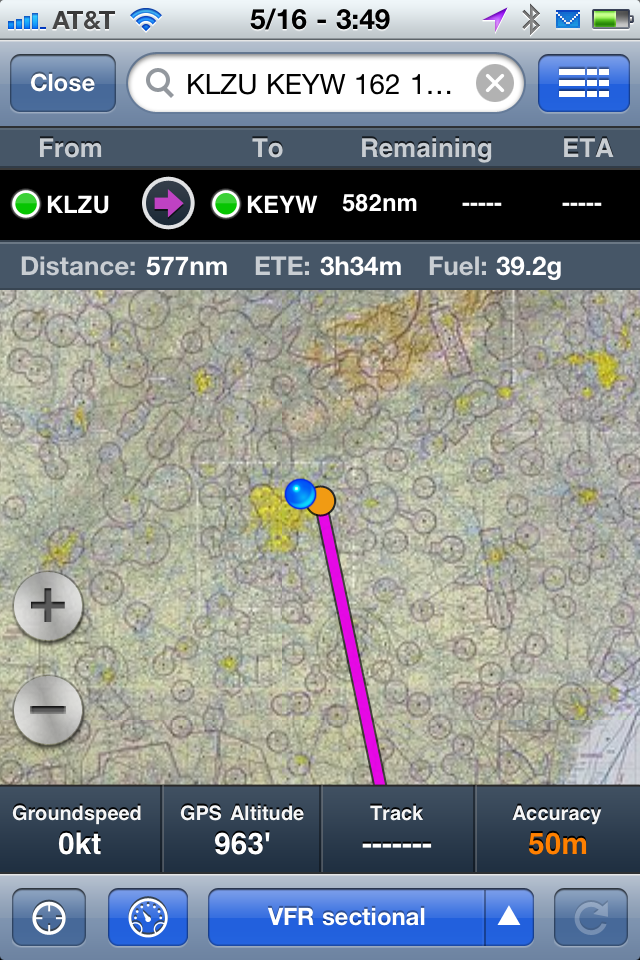
Here you select CLOSE which takes you to this page:
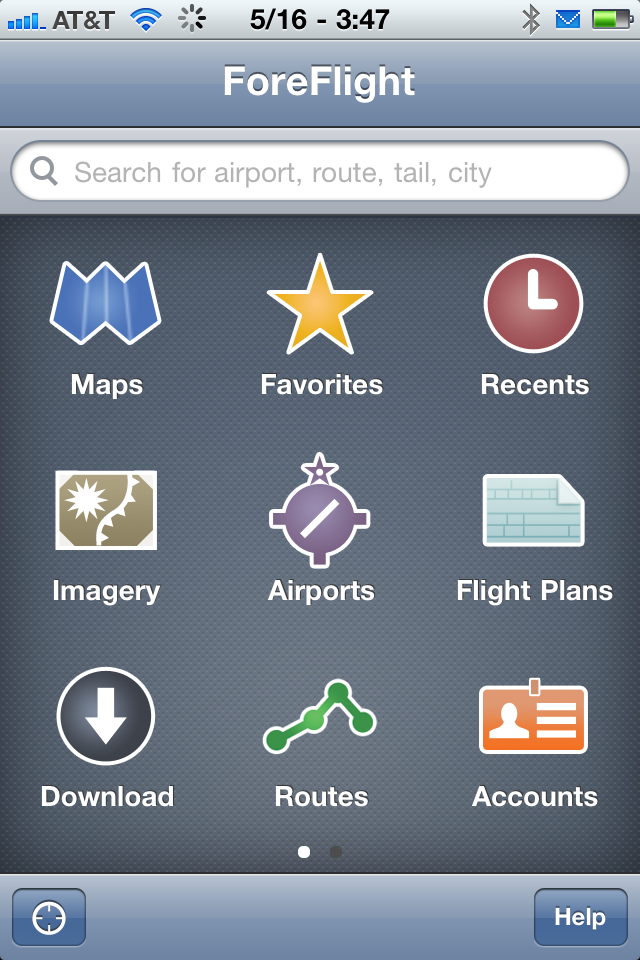
Now you can select the page you want.

I am not picking on Foreflight. Rather, I am highlighting what they have done as an example of adapting to the different screen sizes of the two devices while maintaining a lot of the same feel so that the learning curve is low. However, this is the easy part. Adapting to TV, car, laptop etc. will be a lot more difficult. If you are a pilot you might be wondering why anyone would want to use this program across so many devices. But, if transparent use and data is really achieved then imagine the following scenario. You are watching TV with some friends when the talk turns to playing golf on Hilton Head the next day. You bring up Foreflight on the TV and flight plan the trip to find out the flight time and take an initial look at weather. The next morning you quickly update and file the flight plan using your laptop. On the way to the airport you notice that the morning clouds haven’t burned off as expected so you decide to check the current airport weather. Your car interfaces into the Foreflight app on your phone and you are able to bring up the weather. In the air passengers follow the flight’s progress on the iPad using the same program. You have bought one application and used it across numerous devices. It feels easy and natural to do but it was only easy for you. For the developers it was a tough task. They had to sweat the user interface and how it would appear on different devices. The device manufacturers had to sweat the user interface of the OS to make sure this transparent usage would , well…, really be transparent.

When most people talk about device convergence they are talking about the smartphone. There are actually parallel convergence trends at play and they will eventually run into each other. I mentioned the TV having the potential to pull the media player into the set itself. Now I want to step back just a little and look at that physical ecosystem surrounding the TV. There is the cablebox, the game console, perhaps a media player and maybe even a Slingbox. My system has a TV with a DVR (cable box), Wii, PS3, and a Slingbox.At one time there was also a Netgear media player but that was a less than positive experience. There are two things that immediately stick out with respect to my setup. First there are a lot of wires. Secondly, a lot of capability exists only in one place. The cable box in the bedroom lacks a DVR. I can’t play content recorded on the living room DVR in the bedroom. U-verse would solve that issue but I would have a slower internet connection. I can’t play Wii or PS3 games in my bedroom; nor can I watch Netflix or stream movies off my file server. The tough question is how all of this can be merged into one device, the TV, that can be replicated in each room and networked together. The path is going to be jagged and have many different paths along the way. This means it is a major trend. Let’s outline some potential pathways to my goal. I’m going to start by throwing some things out. The first is the DVD player. As streaming gets better, services like Netflix will diminish the importance of the DVD player. I’ve already discussed the media player merging into the TV. AS for the DVR that’s more difficult because of resistance form companies like Comcast together with Hollywood. I can dream of a Comcast box that resides on my network and serves up video to all of my TV’s while also being my cable modem.  Eventually there will be a single high bandwidth connection to the internet and all movies and TV shows will be streamed to your TV. What about gaming on the Wii and PS3? That’s harder. There is a path but it happens in a couple of stages. Look at how iOS devices are attacking portable gaming. Now look at Apple TV. Why oh why can’t it run apps? It cries to be a big screen version of the iPad.  Well, your TV won’t take touch input but it could take input from your iPhone or iPad. Apple TV doesn’t have to be a great system for the serious gamer. The PC is the serious platform for those guys. The PS3 and the Xbox 360 fit somewhere between the Wii and the PC. Similarly, Android or Google TV could perform the same function running on a or a media box. Once Apple TV has games the only remaining step is to integrate it into the TV. The same is true for the Google platforms. Oh yeah, I haven’t covered the Slingbox. Once your media streams over the internet when you want it rather than on a fixed time schedule, the Slingbox becomes superfluous. It feels weird to write that because, right now, I love my Slingbox and can recommend it highly. However, times keep changing and I don’t see it surviving.

From the earliest days of the PC we have hooked our computers to the TV. Originally the main display device for the personal computer was the TV. As inexpensive, high resolution monitors became available we divorced the computer form the TV. However, there has been a constant pull to reconnect the two. Microsoft made a major push in this area with Windows Media Player. I thought this would be a big hit. I played with the software and found a lot to like. However, I never quite got around to a Media PC. They were either noisy or expensive or lacked certain features. The cable industry dragged its feet on cable tuners and the CableCard and helped to kill off the media center. Rather than enabling a new technology the old guard stood in the path of progress.  This was sad. I liked the Microsoft Media Extender idea. An inexpensive device would allow your Media Center device to ship music, pictures and video to another TV elsewhere on your home network. Today few owners know or care that their Xbox 360 can be used as a Media Extender.

In another attempt to bring media to the TV we have the stand alone media player. There have been numerous devices in this space. The Tvix devices were the first I ran into. Later there were devices from Netgear and finally Apple. Today Apple TV is the best know device but also one of the most limited in functionality. For all of the myriad devices out there, nothing has really taken off. Yeah, Apple sells a lot of Apple TV devices but the numbers pale compared to iPad sales. Yet, there must be something there. People keep trying to get it right.

A related group of devices is the network enabled DVD player. Many of the newer DVD players can stream Netflix and YouTube. This is an easy way for someone to get some media connectivity. Hey, you were going to buy that Blu-Ray player anyway. You might as well be able to stream Netflix. Just click here to check out a nice Pioneer model.

The next group of devices are the network enabled game systems. Netflix is a major item on all of them. The PS3, Xbox 360 and Wii are all Netflix enabled. For a lot of people this is their first and easiest introduction to media streaming. Some like the the PS3 are much more capable than others such as the Wii. Currently I use a PS3 to play movies off of a central file server. The limitation is that I only have one PS3 so I can only stream to one TV.

There is still yet another group. This is the group of network enabled TV’s. Here the TV is connected directly to the network and is able to go on the web or view content off of a file server without an external device. Examples include Viera Connect and Bravia Internet Video. A problem with these devices is that the TV update cycle is very long. Unlike smartphones, people don’t update their TV’s every two to four years. It’s one thing to buy a new $99 Apple TV and quite another to upgrade a $3,000 big screen TV. Still, I suspect this is the winning approach. People want fewer boxes. Convergence says people want devices to merge. Just like the amp, preamp and tuner merged to make the stereo receiver the dominant form factor so I think the game system, media player and TV will merge. In addition, they want connectivity on every TV and not just the big one in the living room. This process will be slowed by several hurdles. Some TV manufacturers, including Panasonic, are going their own way. This will limit the size of their application ecosystem. Those going with Google TV will run into fragmentation as Google has trouble bringing new features to new hardware without making older systems orphans. Apple will want to be controlling. Yeah, what else is new. They will offer TV’s but that means the ever present Apple tax i.e.high prices. They will also face the issue of rapid obsolescence. I have a solution to Apple’s problem but I doubt they will listen to me. Apple should define a small form factor card that holds the Apple TV and allows it to be embedded in the TV and upgraded later. You would buy your LG large screen TV branded with “Apple TV inside!” and upgrade the card for $99 every two or three years. That would keep your experience fresh. It would preserve that unique ability Apple has to make Apple fanboys feel anything older than two years needs to be thrown out after a trip to the Apple store.

A good friend disagrees with me when it comes to the media box getting consumed by the TV. He owns two Apple TV devices. He says they are small and cheap. He feels the difference in the upgrade cycles will keep the devices separate. We’ll see. What do you think?

That sucking sound you here is the phone sucking in other devices. As the phone becomes your computer it isn’t content to stop there. More and more devices will get pulled in. Pity the poor PND. What, you don’t understand the acronym? It stands for Personal Navigation Device. You know those. That’s what you used to own before you realized your smartphone did an entirely adequate job as a GPS device and was always with you.

It isn’t just the PND. In the US, Apple iOS devices (iPhone, iPod Touch, iPad) and the Nintendo DS have about equal market share. Apple’s market share is increasing. Sony is finding it necessary to merge the PSP into a phone. It gets worse. Microsoft hopes that merging Xbox games and Xbox Live into Windows Mobile 7 will help its mobile platform. Portable gaming is being taken over by smartphones and the related spinoff devices such as the iPod Touch.

Do you need some other devices? Let me add two more – the movie camera and the still camera. Dedicated devices are much better than using a smartphone. However, smartphones are becoming good enough for most day to day use. When news breaks worldwide the first video is usually shot from a phone.

Now do you see the scope of convergence or are you saying “Ok, but that’s pretty much it.” Think broader. With near field communication, NFC, the phone will become your wallet. You won’t need to carry credit cards. Your phone will serve that purpose. Just “swipe” your phone near a reader and you are done. It will become a controller for your home and a remote for your TV. This clip says it all.

The computer is merging with the phone. The circuitry to do this is easy. Ouch! I can hear my colleagues in the semiconductor industry yelling at me already. What is being accomplished at the chip level is truly amazing. Processor speeds are hitting 1.5GHz and we have dual core processors with quad core just around the corner. Graphics are now 3D capable and 1080P playback is supported. Storage is 32GB or better. 512MB of RAM is common with 1GB on its way. Wow! That’s a nice laptop from a couple of years ago and a nice desktop from four or five years ago. Still, this is easy compared to the human factors issues.

The transition from desktop to laptop was easy with relatively simple human factors issues involved. The difficult part was the hardware. Software changed very little. Human factors involved things like making the screen thinner and the keyboard better. The smartphone brought basic issues to be resolved. Some, including whether to have a physical keyboard or not, are still being played out in the marketplace. As capability improved, Microsoft went down the “featuritis” path. Windows Mobile started to generate the first batch of application content for phones. But.. it took Apple to blow the doors wide open with the iPhone and its associated app store.

Why Apple won when Microsoft had such a huge head start involves many things and will be the subject of a future discussion. It is a fascinating topic. The simple answer is that Apple used the emerging power included in smartphone hardware to reinvent the user interface. In hindsight, everything prior to the iPhone either feels limited or clunky. With the iPhone we finally got a pone OS that understood it was on a phone rather than trying to be a mini laptop. The success of the iPhone user interface is illustrated by a friend of mine. He said that after getting an iPhone it was frustrating to use his Garmin GPS. He kept wanting to swipe the screen. That’s the sign of a good UI. It quickly becomes natural and you get frustrated when similar devices don’t operate the same way.

Today we have iOS, Android, WebOS, Windows Mobile 7 and several other contenders in the phone/tablet computer arena. We have phones with keyboards and phones without. There are big screens and small screens. With Android there is a mini battle of who can best customize the Android UI. The take-away is that this is a major trend. The path is not clear and is rapidly developing. The winning formula today may not be the winning formula tomorrow. The take-away is that this is a major trend.

According to IDC, there were more smartphones sold in 2010 than PCs. Think about that. Let it sink in. The phone is becoming the dominant computing platform. In the future the laptop will be secondary to the phone. It will augment the phone rather than the smartphone augmenting the laptop. As the phone takes on this new role it will have to evolve way beyond its present state. As this happens the phone will consume more and more devices. Convergence will expand well beyond computer and phone. In addition, a second trend will move to the forefront. That trend is transparency. This includes both transparency of use, i.e. the UI extending across many devices, and transparency of data.

The merging of the PDA and the phone is a done deal. We have moved on to the smartphone that can run apps beyond those of the classic PDA. Still, for many, this is their view of convergence. The Palm Treo showed the way but success led to myopia and Palm is no more. OK, it’s still there and WebOS is being pushed by HP. We’ll see. Call it a dark horse in a tough race. For too long Palm thought that merging the classic PDA with the phone was where convergence would end. They were wrong and by the time they realized it they were way behind. Myopia resulted in opportunity and market position being lost.

Microsoft saw the need for the smartphone. They should be the big winner today. They aren’t. Like so many in the high tech area they thought it was about feature count. They took the merging of the computer and the phone too literally and thought the smartphone should be a smaller laptop. They were wrong. In reality the computer and the phone are moving to a merged but very different use model.  Understanding convergence without understanding transparency can lead to failure. It has for Microsoft. By any rational, technical feature count analysis they should be a big winner. For many years they have had a small version of Office on Windows Mobile phones. They have a real directory structure. Of all of the smartphones they are the closest in feel to a traditional computer. Yet, the iPhone blew them away.  Interestingly, in the end, Microsoft will turn out to have been more right than wrong. Smartphones will gain a directory structure. Trust me on this one. Even Apple will eventually succumb to this. Already the iPhone has Office type apps that sort of work with MS Office files. Microsoft is the loser who gets to say “But I was really right!” With Windows Mobile 7 they stand a chance but they are number three in a tough race.  We’ll have to wait and see if they can get away from “featuritis” and understand both convergence and transparency.

Next up in the success leads to myopia crowd is RIM and the Blackberry line. What a great success story. The push mail capability brought by RIM has revolutionized the phone. Back when email was an afterthought on phones, RIM made it primary and did it with innovation, insight and excellent execution. Just as importantly, RIM courted the IT community and insinuated themselves into the fabric of business life. Today we take mail on our smartphone for granted. RIM is the gold standard for mail connectivity and Blackerry phones are known for their keyboards that make texting and email easier than on other phones. Surely RIM will be a winner as convergence proceeds. Well, in the words of Leslie Nielson in Airplane, “Don’t call me Shirley.” As smartphones have moved from email device to small, app running, computers, RIM has been left behind. Do you see a pattern? RIM left the door open for Apple and Google. Not only did these companies take the developing space RIM ignored but they are now attacking RIM at its core. Just read this article to see how the corporate world, including financial companies, is opening up to Apple. Yes, Apple! The company that was ostracized from the corporate environment and ridiculed by IT departments everywhere is being warmly accepted into the corporate world. Times are changing. The corporate walls that protected RIM have been breached with the iPad leading the way. RIM’s PlayBook is too little too late. If it had hit the market place two years ago it might have secured the corporate world from attack and had IT departments still recommending RIM. Yet again success and lack of vision have led to stagnation.

All of this is what I call classic convergence. The phone merged with the PDA and then became the premier email access device. It would be easy to think that we are nearly done. In reality it has just started.  That’s because convergence is much, much bigger than calendars, address books and email. Stay tuned as I explore the many areas making up convergence and how this ties in with transparency.


I have mentioned convergence and, to a smaller extent, transparency. Both of these are much bigger in scope than what is commonly written about in the media. The trends are broader, stronger and deeper than is generally discussed and will have far ranging impacts on both software and hardware. Our lives are in the process of being transformed.   Hardware devices will come and go.  Some of the near term trends are but intermediate steps destined to be footnotes with our children telling their children “I remember when…”   In Hitchhiker’s Guide to the Galaxy we are told “The universe is big. Very, very big.” I am telling you that convergence and transparency are big. They are very, very big. How big? Big enough to transform our lives rather than being just a small shift. Big enough to cause hardware and software to be created and then to fade away. Big enough to have major companies fight for supremacy or, in some cases, survival. There are companies today wasting precious engineering resources designing yesterday’s products because they are looking so near term that they miss where things are really headed.

Enough of the FAX machine. I want to return to the idea of segregation. Segregation, and consequently convergence, is a lot broader in scope than FAX machines and copiers. There is also data segregation. We have data on our desktop at home and data on our computer at work and data on our laptops and data on our phones. Remember the little locker folder from Microsoft that was supposed to aid with synchronizing your data? No? OK, I don’t remember much about it either. Today we synchronize through Google or Dropbox or MobileMe. This allows us to share some of our data across various devices. But segregation and hence upcoming convergence is broader than that. Whether it is a church directory, our checkbook, an old family recipe, or a list of To Do items we have data everywhere and much of it is physically compartmentalized. We are comfortable with this. Mankind has centuries of adaptation to this model. Just think of the traditional file cabinet. We place things in physical locations and then later, when we need them, we try to remember where they reside. I suspect most people reading this know that this is changing but do they understand how truly pervasive this trend is?

OK, now it’s time for a brief side trip so I can hint at what will be a major upcoming topic in future posts. I want to go back to the FAX machine. When the FAX started getting merged with the printer one thing that made the move successful was the low learning curve. The buttons on the multifunction printer were dedicated FAX buttons. With LCD displays this is now a little different but the concept is the same. Select FAX and the “buttons” are all there. This transparency of use, where there is little training and it is seemingly obvious how to operate a device is a major underlying trend today. Look around and think of all of the different interface systems you learn. There is the TV remote, the game system, the smartphone, and the computer. That’s just a start. Let’s move to the car where many have a complex interface be it IDRIVE or SYNC. Transparency of use, or the lack thereof, is broader than most understand. While related to the idea of ease of use, transparency is much bigger in scope and impact. Together with convergence these two trends are going to drive a major battle pitting many companies against each other and transforming how we use technology.

To fully understand convergence we need to first look at the preconvergence world i.e. technological segregation.  In a segregated world a radio is a radio. a TV is a TV. They provide separate functions. Not only is a computer a different animal but your laptop is mostly segregated from your desktop. Your games are played on dedicated devices or are boxes you take down from the shelf. Books are physical entities placed on a shelf.  This is the land of the DVD player, stereo system, Atari 2600 game system, paper checkbook, FAX machine, copier and many other discrete items. All provide distinct functionality. This is the land of segregation and it has fought a stiff battle against convergence.

For years segregation has been attacked. In many cases the attacks have been feeble to the point of making people believe convergence wouldn’t happen; at least not in some particular are.  Consider the FAX machine. For years there has been FAX software on computers tied to modems so you could FAX from your computer. Few used it. The simple user interface of the FAX won out. The first successful attempt was the merged FAX and printer. Here we have convergence at its lowest and simplest level. But there is something deeper going on here that has big implications for business. The printer convergence with the FAX machine is just a jagged step. Remember the hype over the paperless office? You don’t? Well, in the early days of the personal computer it was the rage. Paper would disappear or so the pundits said. A few years later someone noticed that even more paper was being used.  It seems the computer accelerated paper usage rather than decreasing it. The pundits were wrong; or were they?  This is an example of jagged, wandering paths (yes paths not path) to the final answer. If you jumped to the paperless concept you could take your company down a wrong path. Yet, in the end you would have been correct. We are headed to the paperless office but it is a winding road.   Let’s return to the lowly FAX machine. The first successful convergence is FAX machine and printer. This is a small step and easy on the user. The same buttons are there. But… now there is a scanner since a FAX machine needs one. Now you can scan a document. There is the PDF format. If someone doesn’t have a FAX you can now scan and email. Once this habit is established and becomes accepted why not just scan and email all the time? Finally the paperless office wins a small battle. The tide has begun to turn. What was predicted many years ago is starting to happen but with little fanfare.